Showing posts with label internet. Show all posts

Monday, August 08, 2011

Upgraded from TMNet Streamyx to TM UniFi

Last February 2011, 2 TM UniFi agent came to my house claiming that my area is within UniFi coverage. I checked on UniFi's website earlier but my house address was no where to be found. Since the guy said that registration and the even the installation is free, I then agreed to sign up. 5 months later, after I signed up again online and confirmed that my house address was listed, I received an e-mail that my order was approved and the installation will be done in July 2011. Apparently, TM UniFi's personnel called me up and inform me of an earlier installation date and I happily agreed to it.

Unfortunately, they broke their promise and didn't show up on the date. I e-mailed them back and complain about it and received a reply from their customer support. The installation date was pushed to the following week. Here's how the installation work was done:


There were 2 vans arrived at my house, one contractor is for the outdoor installation and the other is responsible for the indoor installation. Altogether there were 5 people.


I admired this guy who engaged me as the customer and did most of the work compared the other guys. Not only did he brought the barrel of fiber optics cable to the telekom pole, he drilled a hole in my living room.


He then drilled my kitchen wall to insert the fibre optic cables from the outside.


He pulled the fiber optic cables were pulled into my house living room.


The fiber optics cable barrel.


My cracked kitchen wall caused by the drilling. One of the contractor then masked the cracked wall with white plaster.


The guy then sets up the UniFi equipments in my living room.


He and another guys working on the UniFi's connectivity.


My neighbourhood UniFi box connector. In some places, the UniFi connectivity is located underground.


My house TM UniFi equipment up and running.

The next step after installing UniFi is to terminate the TM Net Streamyx and telephone line. There were several issues I've encountered after the installation:

  1. I tried requesting for my house number to remain the same. Unfortunately the TM Point staff told me that I can't have my old phone number to be replaced with the new UniFi telephone number. So there goes my old house number after using it for 14 years.

  2. The TM powered wireless router administration page is very opened. Even though I've disabled the remote access to the router, until now I can't seem to change the password (current password is just blank).

  3. I spent 2 days configuring the TM powered wireless router to work on my laptop. Only my laptop couldn't connect to the WiFi, the rest of laptop, PC and mobile devices in my house could connect to the internet without any problem. I tried configured everything I know on my laptop, installed and uninstalled several drivers and software but nothing seems to work. In the end, I hooked up my old wireless router back and my laptop automatically connects to the internet.

  4. After consuming gigabytes of data (I am a heavy downloader once in a while), I think one the UniFi devices crashed and both the HyppTV and the internet is not available anymore. This had occur twice already. The solution is to reset the whole boxes (Consist of the UniFi modem, Wireless router and HypTV box; Switch off for a few seconds and switch back on after that) and the UniFi services will be back to normal. Don't bother tinkering into the admin page or call the customer service unless if you really need to.


If you want to read a full detail story of what happened before the installation, you can read it on my Malay blog here, that is if you can understand Malay language.

Overall, I am satisfied with TM UniFi services. There are moments when the internet line was really slow, I guess not all of the servers can cater for the high speed connection. The only significant improvement I've noticed is when watching YouTube where you don't have to wait for the buffering video anymore. The HyppTV/IPTV is crystal clear and at the moment I'm enjoying all of the HyppTV channel free for a month (1-31 August 2011). That's all for now. Do leave a comment if you would like to ask me anything.

Cheers.

Friday, December 10, 2010

The Best Daily Mobile Internet Prepaid Option in Malaysia

We all have different need of internet usage. I normally use an average of 400 - 500MB (upload and download data transfer) usage per day. Total that up for one month, that would take up almost 15GB per month of data usage. However I find it hard to reach 15GB per month except if I am on a downloading quest for movies and videos stuff. The best internet option for me will always be TM Net Streamyx. However when I go travel for example like right now I am in Tambun Ipoh, I would bring along my Huawei E220 USB modem which is powered by DiGi Internet Prepaid. Lucky for me, my in law's house is within the area of 3G Internet Broadband services for all the Telcos available.

A couple of months ago, I have no issue with DiGi Internet Prepaid as it serves my purpose quite well. Although the top download speed is capped at 384kbps, watching YouTube videos has not been a problem. The download quota of 3GB per month never been exceeded as I only use the pre-paid internet line for 3 - 4 days sometimes 10 days per month. At RM2 per day, it was the perfect internet replacement for me while on the go.

After haven't been travelling for a while, I realized something new happened. I got this SMS in my Mobile Connect application:
You have reached the 100 MB daily quota. However you will continue to enjoy unlimited Internet usage at 128kbps until the next quota reset at 12am

I was shocked. Immediately the internet speed dropped and my download was downgraded. This is not a good sign. I did some Googling just now using the now throttled internet speed of 128kbps:

DiGi Internet Prepaid


Oh dear, I need to find a solution for this. I did some checking around:

Maxis Hotlink Internet Prepaid


Celcom Broadband Prepaid


I am a Maxis postpaid user on my Sony Xperia X10 Mini. However Maxis has the most expensive plan with RM8/day and only 500MB per day. I also have a DiGi Prepaid sim-card which I hardly use, at RM5/day and only 100MB per day, this is even pricier than my DiGi Internet Prepaid at RM2/day. The best option for me right now is to go for Celcom Broadband Prepaid at RM6/day with 1GB per day.

I should make a comparison table for this but I am too lazy to do it right now. Now, I need to find myself a Celcom Broadband Prepaid™ Pack somewhere here in Ipoh.


Update 1st February 2011: I subscribed to Celcom Broadband Prepaid on Celcom Blue for RM18 weekly (Sim Card cost me only RM3 during a promotion). The line only managed EDGE connection with unstable internet connection even on the 18th Floor of Menara PJD, Kuala Lumpur. The same goes when I was in Tambun Ipoh. So, it was a no go for Celcom Broadband Prepaid for me.

Update 12th February 2011: I bought Celcom Broadband Prepaid pack just now at a Celcom partner's booth (Only RM12.50) at Giant Ipoh (Tried to buy one at Celcom Blue Sunway Pyramid but they said they ran out of stock). I realized that the Celcom Blue sim-card doesn't have 3G capabilities which is why I couldn't get a good speed the last time I tried. I am now on HSDPA line powered by Celcom Broadband Prepaid.

Friday, October 15, 2010

TM Net Internet Streamyx Downgrade

On the 29th September 2010, after much thought and consideration, my family made a decision to downgrade the current package of Streamyx internet. This is to reduce our monthly payment for TM services that we are paying. At the moment we are paying RM149.40 for a rarely used telephone line with 1MBps Streamyx Internet line. The internet line is the busiest because my family has 4 computers connecting using WiFi. My mother is now an avid user of Facebook since she uses the internet to learn new stuff and interact with her old friends whom is also catching up using Facebook as well.

I discovered from my brother and also other people using Streamyx 384Kbps that the speed was sufficient for normal browsing and casual download. So the decision is final, we wanted to downgrade the existing 1MBps Streamyx to 384Kbps. After making calls to 100, the best way to downgrade is to go to the nearest TM Point which is for me located at Kepong. Since the line was still under my father's name and my father passed away last December, I first had to transfer the account to my name first by filling up a form before I can apply for the downgrade (RM10 was charged for the account transfer).


TM Point Kepong design is quite nice and comfortable, as usual the queue required me to wait for almost half an hour before my number turned up.


Here's another view of TM Point Kepong.


The only thing that surprised me was that my internet line would be disconnected for 2 weeks in order for the downgrade to proceed. I then asked when will the line would be cut, the guy at the counter said immediately. So, I was out of internet for 2 weeks. I had to use alternative broadband internet I have which is the DiGi Internet Prepaid that I've bought a while ago but the reception in my house was really slow. I then tried using Daily Unlimited Celcom Xpax Prepaid Internet during last weekend, the speed was acceptable but the budget was a bit steep for me.

I made a call to 100 last week which the operator told me the downgrade request hasn't been processed yet. So yesterday I made another call where I got the same answer with an additional information that I can request for a rebate for the entire stretch of my downtime (that was nice to hear). Last night, when I got back from home, my internet Streamyx was restored. A total downtime of 15 days.

So there you go, that was my experience downgrading TM Net Internet Streamyx.

Thursday, July 29, 2010

My Blog On Mobile

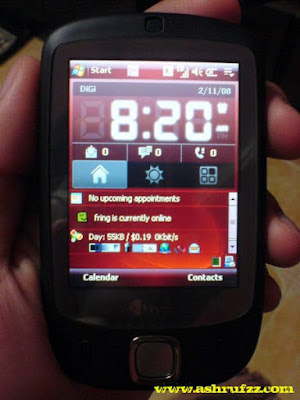
Once in a while, I browse the internet on my HTC Touch PDA. I have no interest yet in owning an iPhone because of the price so I make use of everything that I now own. Recently I've tried out Sony Ericsson Xperia X10 Mini. It's an awesome piece of smartphone with amazing touch features.

There is a drawback when using mobile phone for browsing the net. Apart from having to pay for the data charges (that is assuming if you are not not subscribing to any data plan provided by your mobile carriers), the screen is just to small to look at all those amazing design and features a normal web browser can provide. Nevertheless, when using these tiny little small screens, we only want to read text or maybe some resized pictures or images.

Because of this, it would be best to provide your blog with tools to help people who loves your blog but only have time to read them on their mobiles. There's a solution for this, Onbile.


Whenever a mobile user logs, the javascript provided will detect whether you are browsing using a mobile phone or a normal browser. This would really help your mobile readers and encourage them to visit your blog more often.

The only issue I have is:

  • Only 2 pages of your title list will be available (I am guessing this would depend on your feed setting)

  • You can't revert back to your original layout once it's loaded on your smartphone


I am still going to try this tool for a while and see if suits my need or else I am going to remove it and search for another tool or Wordpress plugin.

Sunday, November 02, 2008

My HTC Touch

It has been over a month after I got my hand on my latest new gadget, my HTC Touch. I've always been keen to have a Windows Mobile device. There is one lying around my house which belongs to my dad and he's not using it. However, the device is bigger than my handphone and the features and the battery is not up to my use so my brother is toying around with it. Recently, my dad bought himself a cheap chinese made TV-PDA phone which he found somewhere in Dubai, he wanted to sell off his HTC Touch. I immediately said I wanted it but of course I'll pay for it later.. ;-)


My HTC Touch on DiGi Broadband Mobile
 

The best thing I found out about HTC Touch is its lightweight, running on Windows Mobile 6 Professional, the battery's life is not bad and the touch screen is just something cool. Of course if you compare that to an iPhone, the iPhone is way much cooler. However, the iPhone is more expensive plus there is a lot of softwares that I need doesn't work in iPhone. The only downside in terms of network connectivity is my HTC Touch is running on EDGE and doesn't have 3G connection. Because of that, I choose to subscribe to DiGi HighSpeed Mobile Access with Data Unlimited Plan. I'll cover my experience using DiGi Internet service in my next blog post.


At first I wanted to replace my Sony Ericsson W810i to this HTC Touch. Unfortunately, I found out that typing SMSes using the HTC Touch is so difficult and required precise touching of the screen for the right alphabet to appear. It then became clear that the HTC Touch can only be my second gadget in my pocket.


Thanks to my brother who is using Windows Mobile much earlier than any person I know tip me on a great mobile browser call Opera Mini. I once used my boss's iPhone and recalled how the browser on his iPhone could just slide, zoom in and out. It was so cool, little that I know this browser installed on my HTC Touch could do the same.


ashrufzz.aisyshop.com on Opera Mini Mobile
 

Another application that I like to use is Google Maps for Mobile. Since my HTC Touch doesn't have GPS, the My location function which tells me the nearest node of my DiGi coverage as you can see on the dot on the screenshot below:


Ashrufzz on Google Maps Mobile
 

The star is my favourite places where I used to hang out. It can also be used to estimate the distance of location where I intend to go and show me the route to go there. This is the best application I always run whenever I am hitting the road. If you noticed on the screenshot, I am using a Pocket Controller software. This way, whenever my HTC Touch is connected to my laptop, I don't have to tap the device using my hands anymore. It can work with my mouse and keyboard. Simply genius..


I guess I am becoming more of into gadget junkies with so many electronics I have on my hands. Got to keep on getting more and more resources to fuel my hunger of information technology.

Sunday, August 10, 2008

Using Maxis Wireless Broadband in Kuala Terengganu

I'm currently in Kuala Terengganu with my family. My brother just got married with a Terengganu wife and he will be on a 2 weeks holiday after this.


My family at the moment is living at Homestay here at Losong Kuala Terengganu. It has 4 rooms with 3 bathroom and the house is big enough for the comfort of up to 5 families. If you are interested to rent one of the Homestay houses, details are available on the picture below:


D'Losong Homestay Kuala Terengganu
 

At Homestay, you won't find any Wi-Fi service available. So, I brought and setup my own Wi-Fi connection using Maxis Wireless Broadband and a wireless router. Here in Terengganu, there are billboards everywhere telling that Terengganu is Celcom territory. So far, almost 4 laptops are now connected and the connection speed is so far quite reasonable. Here is how the setup is being done:


Setup of Maxis Wireless Broadband with Wireless Router for Wi-Fi connection @ D'Losong Homestay Kuala Terengganu
 

The ZTE modem is actually a router by itself so there is no need for any configuration except if the network address clashes or something. The internet connection is running on UMTS speed, it's not that fast but so far I've been using Skype with webcam while running Youtube and downloading stuff without any problem.


UMTS Maxis Wireless Broadband connection in Kuala Terengganu
 

I don't really trust on bandwitdh test but it is safe to say that Maxis Wireless broadband here in Losong Kuala Terengganu is pretty good.

Tuesday, April 01, 2008

Can Enterprise Online Sales Demo Really Work?

I’m writing this post using my brand new upgraded Wordpress 2.5 platform. I find it good enough although I do missed the big old dashboard that has all those big fonts. Anyway, last week Thursday night there was another webinar which I’ve forgotten that I’ve already signed up to attend it online. I just realized about it the last minute when I suddenly received a reminder e-mail just before the online webinar was about to start.

Since the webinar was organized by Citrix, the organizer had everybody attending to install their software in order for them to show their presentation slides. Unfortunately, the audio is only accessible by dialing a toll free US number. Again, I used Skype for this purpose. It was interesting despite living in Malaysia, I have the same facility as what my counterpart in the US have. I just love being online on the World Wide Web. Here’s a screenshot of my desktop setup. (For those of you who like to analyze what type of person I am, you can see what application I have on my desktop as well *wink*)-

Ashrufzz Desktop Preview
My Desktop Preview
 

I love how the Citrix online presentation flow was handled. I’ve been to a lot of presentation from my experience attending talks, seminars and webinars and normally I can spot which presentation can attract my interest. This one, eventhough I can’t see the speaker’s face, the presentation style is quite good plus there wasn’t so much of a hard selling effort. Here’s an interesting slide I’ve taken from my desktop screenshot while hearing to the webinar:

Citrix Online Webcast
 

Last year in December, I attended an online presentation meeting with a Canada based company. They use Adobe Connect to perform their slideshows and again Skype as the main audio communicator. That was my first time I’ve ever experienced a one to one online sales presentation and it opened my eyes to a whole lot more the usability of the web. I recorded everything using Camtasia software for my keeping.

An interesting perspective here is, not everybody is exposed to this new technique of doing demo presentation live on the internet. It might be useful at some point but there is so many technical aspect to take care of, at least initially. Anyway, the future of doing web conferencing online looks quite promising and I do look forward paying attention to it very closely.

Thursday, March 20, 2008

2 Webinars in A Month

It has been a while since I've attended any seminars. The last would be during a conference my company sponsored a table top. But that doesn't stop me from attending seminars. Nowadays, you can even attend a seminar from the comfort of your own office desk or even your bedroom with the creation of Web Seminar or better known as Webinar.

Armed with only your flash configured browser or special software and a decent broadband internet connection, you can attend or even held a webinar. So on the 5th of March which was last 2 weeks, I attended "MarketingProfs B2B-2.0 EXPO". Since the webinar was hosted in the US, it was almost midnight from where I live but I was still at my office doing some last minute assignment. Here are some screenshots of the webinar I've taken during the webinar:

B2B 2.0 Expo 2.0 Main Area
 

Since this webinar is using flash, it requires a little bit of download time and also consumes most of my underpowered Intel Celeron M notebook processor. It does kind of annoy me especially when my so called broadband internet somehow drops in between.

B2B 2.0 Expo 2.0 Booth
 

The booth are not the kind of booth you see at normal tradeshows and seminars but at least you can get information easily by just clicking and it automatically insert information inside my virtual briefcase. The only thing that I don't like is how the sales chat is handled, it was so slow to load.

There's also some free gift in a form of free PDF information download and stuff. Well, I did download some of them but it'll just add more collection to my PDF junk inside my laptop. They did follow up by sending me e-mails but I won't really bother on their offer and stuff since I'm not seriously in need of such services yet. I'm just there to gain a new experience.

Pre-Training Webinar


Last night, I attended another webinar. This webinar is supposed to be done at my office since it's related to my job but I had the permission to do it at home since the webinar is held after my office hours. Furthermore, I need to make a recording of this webinar to be shared with my team mates so I need a stable internet connection. Apparently, my internet connection at home is much more stable than my office.

I missed 10 minutes of the introduction to the webinar because I misunderstood the instruction which required me to call a toll free number in the US. The webinar was held on Microsoft Live Meeting and I thought the audio would be included. I then remembered that I can use Skype to make phone call to the US and lucky it went through since its toll free anyway. Check out the video below to see the webinar live in action inside of my own bedroom:


ARCHIBUS Pre-Training Webinar @ Home from Ashrufzz on Vimeo.
 

I'll have more events going on the next following weeks so I'm looking forward to that as well.

Thursday, February 07, 2008

My Webhost Fanatical Version Upgrade

I hope my webhost have learned their lessons when the attempt to upgrade/repair the hard drive containing all their paid web hosting customer, resulted in a catastrophic hard disk failure which wiped out the entire hard disk with no possibility or recovery. It was truely a painful moment for me when that happened. Eventhough my blog was just 11 months old with some casual updates, I also add-on a few domain names on the same web host since that was the most economical thing to do.

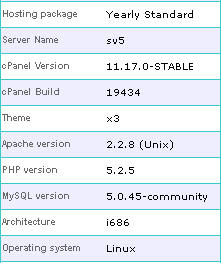
Anyway, my web hosting will expire end of this month. I've decided that I shall remain with my web host which is Byethost for one simple reason. They are fanatically upgrading each and every components on the web host to the latest version available.

Byethost Current Component Version List
 

If you have no idea what I'm talking about, install this add-on for your Firefox Browser called Server Spy. It will tell you which version of web application server the website is using. New version normally has bugfixes and contain more new features for you to enjoy such as the one my web hosting is using which is Apache 2.2.8.

Despite the economical factor, I have plans to buy another web hosting for not to put all my eggs in one basket. I have 4 days of geeky days at home this Chinese New Year holiday so I might be doing a lot more of my online activities as what I've been doing before.

Friday, February 01, 2008

How to Remove RavMonLog Virus

In this post, I'm not going to insert any pictures or images. It has been a while since this problem occured. I've tried a number of those free anti-viruses (I'm stingy okay..hehe) and none of them work. I tried using a Ravmon Removal Tool (right click and save as here to download) but it didn't cure my problem. I haven't try the new version called the Smart Anti Virus 1.0 but I'm going to check it out soon.


Anyway, one of my colleague here at my office circulated an e-mail on how to remove RavMonLog virus. I've tried it myself, and it works:


THREAT NAME
Worm.RJump.A


CLEAN INSTRUCTIONS


  1. Right click on an empty space from the taskbar (or right click on the clock from the right corner) and select Task Manager.
    - Select the Processes tab, locate ravmon.exe, right click on it and select End Process
    - Delete the following file: C:\Windows\ravmon.exe

  2. To clean the removable storage device (USB stick, PEN drive etc.) right-click on your USB stick / PEN drive icon and select Explore.NB: Be careful NOT to double-click the icon because the malware will be reactivated.
    - Locate and delete the autorun.inf and ravmon.exe files

  3. Click on Start, Run, type regedit and click on OK.


NB: Before you edit the registry, please export the keys that you plan to edit, or create a backup of the system before you proceed.


  1. Navigate to HKEY_LOCAL_MACHINE\Software\Microsoft\Windows\CurrentVersion\Run

  2. Delete the "RavAV" = "C:\windows\ravmon.exe"


SYMPTOMS


  1. Presence of the autorun.inf and ravmon.exe files in the root of the storage device.

  2. Presence of a copy of the ravmon.exe file in the windows system folder.

  3. Presence of the RavMonLog file that contains the port number for the backdoor component.


DESCRIPTION


  1. Worm.RJump.A spreads by creating a copy on removable storage devices or mapped drives.

  2. It drops the following malicious files:

    • autorun.inf

    • ravmon.exe


  3. Also it drops a clean msvcr71.dll file that is a part of Microsoft Visual Studio.

  4. It opens a port for the backdoor component.

Sunday, December 23, 2007

The Benefit of Using A Virtual Private Server (VPS)

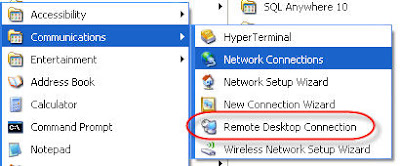
I believe that every one of us are promoters. If we feel good about the stuff that we use, we will always tell it to someone else whether directly or indirectly. Today I'm going to write about a new high tech tool that I've been using for the past 2 months. Being introduced to Remote Desktop Connection (RDC) during one of my visit to a Microsoft road show, it has truly changed the way I've been looking at computers. If you are using Windows XP like me, the application is already built inside START > All Programs > Accessories > Communications:
Win XP Default Remote Desktop Application


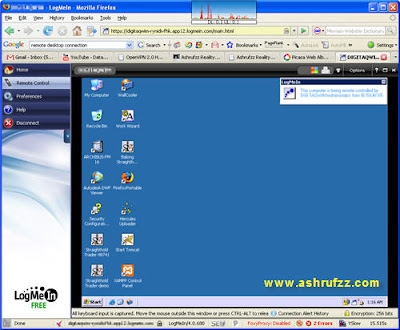
If you have never used RDC before, you need to find another PC for you to connect and try out. However, it is best if you are familiar with IP Address and networking configuration before you use this facility. This application when in use and connected, acts like your normal Windows but you are actually controlling another computer remotely. If you want a free web-based application that is easy to use, one more tool that I use is a web service called LogMeIn:

My LogMeIn Web Application


If you look at the screenshot above, that is my remote computer or specifically known as a Virtual Private Server (VPS) located half way across the globe in Pennsylvania, US. I pay USD19 per month to use this VPS which is always online 24/7. If you do the math, I save a lot by leasing this VPS instead of owning one simply because:


  1. I don't have to buy those expensive PC/Server stuff that will cost me thousands of dollars

  2. The VPS is always online 24/7 and I don't have to worry about high electricity bill because the extensive need of cooling system the computers/servers need to have

  3. The download connection in the US is superb. At 1GB per second network connection, it is hundred times faster than my normal internet connection. Of course, getting that file to my PC requires FTP that is limited by my internet connection

  4. I can use a unique static IP address for my website or web apps for a fraction of a price rather than leasing one from my local ISP


My only problem for using this VPS is it can be sometime slow just to access and because of the low price, I only get 256MB of RAM which is rather limited. Occasionally, I need to restart my VPS at least once a week to free up the RAM or the VPS will crashed. Well as usual, you get what you pay for right?

If you are interested to use a cheap VPS for your Windows remote development or even Linux powered one, check out SWVPS. I'll write more of how and what I have use my VPS for in my next following post to come.

Monday, December 17, 2007

I'm Heart Broken

My web hosting just recovered from a serious hard disk failure. All the data, my websites are all gone! I only had back up for just my blog. I had a horrendous weekend! I think it is time to change to a new web host.

I have to rebuild back all of my website thanks to not making back ups and thanks to my web host who was in hurry of upgrading their hard disk and corrupted all the data. I feel so miserable right now. Later..

Friday, December 07, 2007

Being Locked Out From My Own Blog

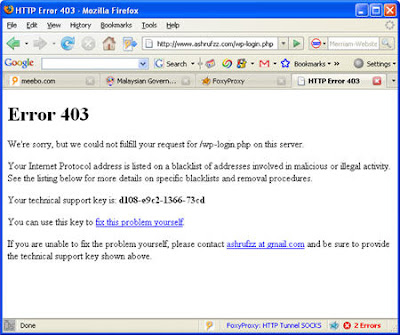
I was trying to log into my blog control panel and all of sudden this screen showed up:

Ashrufzz 403 Page


At first I thought my office IP address was being blocked. So I thought, maybe I'll try and access it from home and see if my home IP address can get through. Then I said to myself, "How come I am using my new found proxy server technique but still I can't access my own blog?", "There must be something wrong here!". So, using my new HTTP-Tunnelling proxy technique accessing through another web-based proxy called Guardster, I still cannot get into my blog control panel. Now this is ridiculous!

I suspect that there might be something wrong with my plugin, so I immediately went to Bad Behavior plugin blog. There it is, a download solution to my login problem. Now comes the most challenging part, replacing the plugin with the new updated one. My FTP was not working because there is a connection problem where the directory can't be retrieved. I had to do it using my web hosting control panel file manager and replace the files manually one by one. It took me longer than I thought because the download files were not being in the order as the previous plugin.

Luckily, I still managed to log into my blog eventually. Frustrated, I decided to disable the Bad Behavior plugin once and for all. It's a shame though because this plugin is good to prevent blogging spam. Without this plugin, I predict my Akismet spam plugin could easily reach thousands with the amount of traffic I received nowadays. I should have hacked into my Wordpress database and disable this plugin but I don't want to mess around with it since I haven't done my back up yet.
I can't imagine someone who doesn't have the necessary skill of repairing a Wordpress blog enduring this problem. Being blocked out from your own blog can drive you NUTS! I hope that this incident won't happen again in the future.

Sunday, December 02, 2007

Breakaway From The Corporate Proxy Server

It has been a very busy week lately. However, that doesn't stop me from being idle. When you work for a company, you can't really work throughout the whole 8 mandatory hours, it is advisable to take a short break. What normally what happen is that break becomes a long break where for most PC workers would wander around in Cyberspace. That's when it affects the productivity of a company. I am guilty of doing that as well but eventhough it is unethical, I kind of redeem myself by not claiming for overtime hours when I come home late so that it is fair for both myself and the company. I think everybody do this type of thing, I even saw my superior got caught by me in the act.

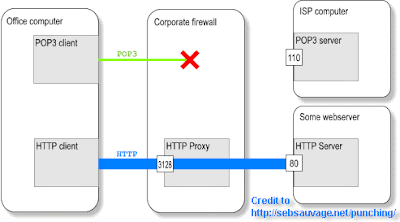
Because of that reason, unlike home network where all the network ports are accessible directly to the internet. The IT department in my company deploys a proxy server and a dedicated network port for accessing the internet. To make it more comprehensible, here's a diagram taken from "Punching Holes into Firewall".

How Corporate Firewall and Proxy Server is Put Together


The reason of this deployment is because:


  1. To prohibit the idling staff to surf time wasting websites such as blogger.com, friendster.com, youtube.com that can eat up a lot of your office time thus reducing your productivity

  2. Instant Messenging is blocked because it is also considered time wasting as well. Think about it, which one do you spend more time on, chatting on Yahoo Messenger or calling people up on the phone?

  3. These kind of social networking activities can consume a lot of bandwitdh and bandwitdh is expensive (except if you have chosen an unlimited plan). For critical moment, these activities can clogged the router's performance (if proxy server is not installed) and affects your internet connectivity

  4. To prevent intruders/hackers from entering the network from outside of the domain beside protecting the network from any harmful viruses, malware or network attack

  5. Why are you doing personal stuff on the internet during office hours? You are breaking the agreement you have signed when you were employed, right?


All those reason are so valid. I must say that I can even get fired almost everyday if I get caught of doing personal stuff during working hours but then again, as human we are not robots. We need some loosen up a little so that we can cope with the busy hectic environment or the quiet idling moment.

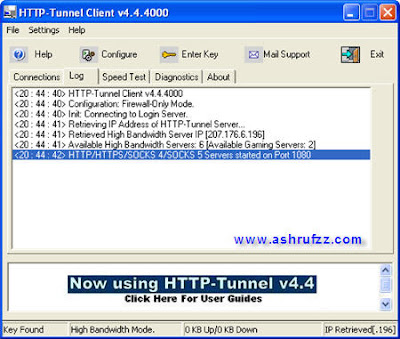
Luckily, Google Search website is not being restricted. This is where creativity take place. Using a combination of the right keywords, I found, "How to Bypass Most Firewall Restrictions and Access the Internet Privately aka The Surf At Work Page". I find the page to be quite technical and time consuming for me to understand how the method is. I saw an advertisement on the page and soon downloaded a software called HTTP Tunnel. Now this is what I am looking for all along, a simple Windows-based software that I can install and easily configure.

HTTP Tunnel Software


I wasn't happy about the restriction especially being blocked from Youtube. Using this software, I can now watch Youtube eventhough the corporate network has blocked the website. At first, I used the free server to connect but it was painfully slow. I wanted to pay the High Bandwitdh Subscription using my Public Bank Visa Electron but accidentally paid it using my Paypal credit. Oh well, it's only USD4.99 a month. Doesn't burn a hole in my pocket though.

Voila..I can now watch my favourite Youtube videos and my company wouldn't know what my online activities are. Although it says high bandwitdh, it is still limited to the internet connection my company subscribed from the ISP which in this case, TM Net Streamyx. I can now access Meebo, Friendster, Youtube and Blogger without fear of being blocked. The only problem right now is my Yahoo Messenger client program wouldn't work even after using this service. I then learned that the port for Yahoo Messenger is being blocked so I can only access the web-based Instant Messenging service such as Meebo. Oh well, that's not so bad.

It is good to know that there is no boundary what you can do over the internet. You just need to be a little creative and a little work to find the solution that you need. Happy proxyless surfing everyone!

Monday, November 26, 2007

A New Way of Internet Protection

I just love the concept of virtualization. It's like doing something dangerous but in a contained and controlled environment where it is basically safe. Before this, I've seen how a big corporate IT department utilizes VM Ware for their server virtualization, tried Virtual PC on my own computer and the latest, Virtual Private Server. If you've seen movies such as The Matrix or the 13th Floor or you've played Second Life, you might understand the concept of it. If might provoke some radical idea of how you live your life but I think it is natural of a human being to fantasize about something that they don't have.

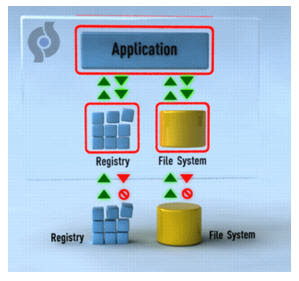
I found this free application a couple of weeks ago. It's called SafeSpace. So, how does this virtual application works? Well, a picture describes a thousand words:

How SafeSpace Works


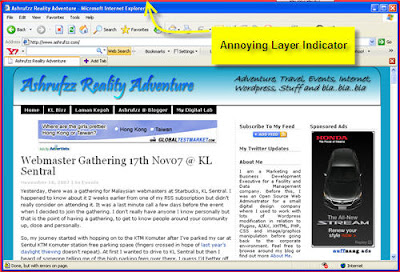
If you can't understand the figure above, let me just brief you a little bit. See that red box surrounding the registry, file system and application. SafeSpace actually creates some kind of layer on top of what your windows system have. Basically it's like a protective layer that protects you from getting something harmful. If that layer gets an infection, you just tossed away that layer and you'll have a new one. Sounds like a condom to me. Anyway, based on my experience, my Internet Explorer version 6 has been hijacked by numerous toolbars that suddenly appears out of nowhere. There was one time, my Internet Explorer 6 just went unusable because it got corrupted by these malware stuff. In fact, even before I installed SafeSpace on my system, there was a pop up box that keeps on appearing whenever I launch IE6. I tried cleaning up my registry and boot up applications but it was still showing up. Luckily, after I've installed SafeSpace, that pop up kind of dissapear. My problem was solved.

There is however one issue that was quite significant. The installation of SafeSpace caused my boot up to become longer. I had to wait almost 5 minutes before I can launch any other of my other application. Then there is this annoying coloured box surrounding the application which I don't like. Since I'm using Firefox for my browser and normally Firefox doesn't get hijack like IE6, I removed Firefox from the default setting of SafeSpace where it includes every Instant Messenger and browser that you have. From what I heard, this application is still buggy so it's not really recommended if you are the kind of person who just use a computer for basic need. Oh, there is one more issue concerning SafeSpace. When I tried to insert attachments in my e-mails, the files just went corrupted. Most probably because of the layer filtering the files you are trying to put in.

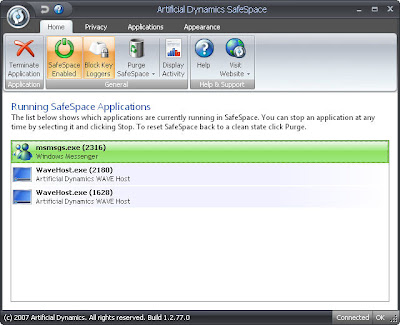
The plus point of SafeSpace is that it prevents your internet browser from being hijacked and most of all it's FREE (for personal use of course). Some screenshots of SafeSpace in use:

SafeSpace Layer on my browser
My SafeSpace Screenshot

Visit SafeSpace from Artificial Dynamics for more information.

Sunday, November 04, 2007

Trying Out Celcom 3G Broadband

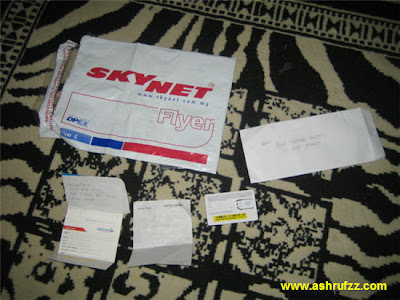
My brother has the same interest as me, he likes to try out new things which is internet-related. He is an active member of few Malaysian tech and trading forums. Last month, he got to know a guy who can register Celcom 3G broadband on your behalf and send it over to you by post. The only fee you pay him is just the courier fee. The Celcom 3G price is just the same as advertise that is RM68. A few days later, the package arrived:

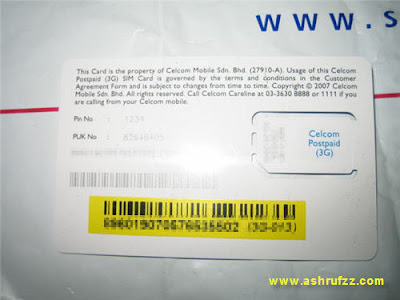
Celcom 3G Broadband Package delivered by SkynetCelcom 3G Simcard


Since this Celcom account wasn't mine, I asked my brother to lend it to me for a while for me to do some testing and review. He uses a Dopod 838pro phone so he enjoys the 3G capability when using this Celcom 3G service. I don't have a 3G phone yet, so I had to settle with my own Sony Ericsson W810i that only has EDGE capability. An EDGE connection can only serve a maximum speed of 200++kbps but that way better than dial-up connection. A 3G connection speed particularly UMTS is around 384kbps while the HSDPA is even more. I don't know if Celcom's connection is HSDPA, but I've used Maxis HSDPA connection before and I find it quite good. However, radio signal tends to distort according to the strength of radio waves and the surrounding of environment. So I can't expect a fast and reliable connection all the time. Sometimes, the setting of your computer can dictate your connection. You need to tweak and fiddle around a little if you want more. The best internet connection is always the old fashioned hardline landline.

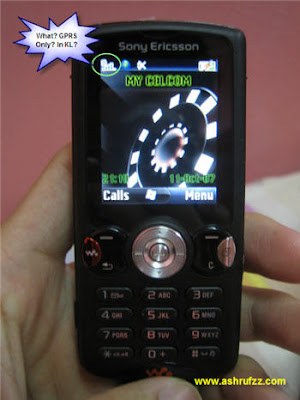
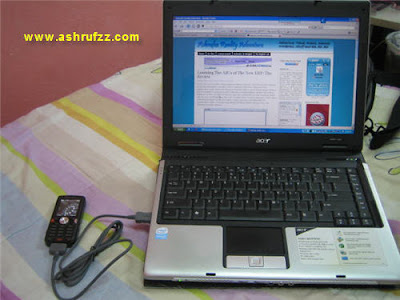
Celcom 3G on My Sony Ericsson W810iMy Sony Ericsson W810i with Celcom 3G on My Acer Aspire 3683


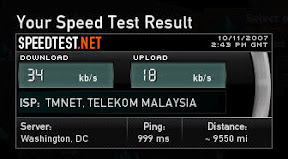
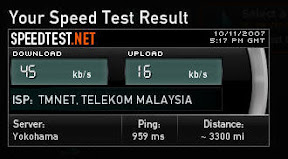
So, after installing Celcom 3G simcard on my phone, I noticed something, the Celcom connection in my room stated a GPRS connection. Oh well, what to do.. I then hooked it up on my Acer Aspire 3683 laptop, surfed a few websites and later on, documented some speed testing, here are some results based on my experiments:

SpeedTest to WashingtonSpeedTest to Yokohama


The connection is not so bad after all eventhough it's only on GPRS/EDGE. The only problem I faced is my phone tends to warm up when it is connected. That's not really good. I left my laptop and phone connected throughout the night, the connection was pretty decent. One more thing if you noticed, the speed test is still stating I'm using TM Net. I'm not really surprised because it's not really a secret that Telekom Malaysia owns most of Malaysian internet infrastructure. Anyway you look at it, it is still "inter" "net" conection, so you'd better appreciate it. At least you are "connected" instead of "disconnected".

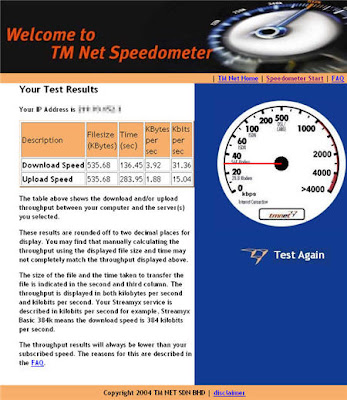
Last but not least, the TM Net Speedometer test:

Celcom 3G TM Net Speedometer Test


If you are wondering why not buy the new 3G USB modem? It costs around RM1000 just to buy that fancy device. I would rather buy a 3G enabled phone for that. The choice is yours.


Thanks to testking, now a big dilemma of 350-001 and VCP-310 students has been solved since they will be able to purchase a bundle having 640-802 as well as 70-290 and 70-270, and if they want to, they can exchange it with 220-601 too.

Wednesday, October 10, 2007

Learning The ABCs of The New ERP: The Review

Since I am now involved in the enterprise solution industry, I find the last live webcast was quite informative. Basically, what I understand from the webcast is that organization needs Enterprise Resource Planning (ERP) to grow further ahead. Most of the presentation is geared towards software or implementation vendors that deliver ERP tools for the use of the buyers (my job role involves this as well). However, there are too many stuff that were way over my head which I have no idea yet. I might need some time to digest all the information I guess. Anyway, I've embedded the presentation slide on this blog post along with the recorded webcast if you are interested to learn about it.


View the recorded webcast for this presentation

Saturday, August 18, 2007

Maxis Wireless Internet 3G Broadband Review

This post was supposed to be published two months after I've registered myself with Maxis Wireless 3G Broadband. At that time, I was no longer in their trial period. Well, as you might have known, I got sidetracked for a while. My first Maxis wireless internet bill arrived in my mailbox on 25th of June 2007 with an amount of RM162. Correct me if I'm wrong, if you want your money back (you don't actually, if you do it normally takes time), you will need to return your modem and the phone given to you between 30 days after you've submitted the form, in other word once your name is keyed into the system, the trial period begins. Again, if not because of I would really want to try and use this facility, I wouldn't have signed up for it.

If you are still interested and wouldn't like to go to KLCC, you can go to PJ Digital Mall or Low Yatt, they might have a booth somewhere where you can try out the demo computer first and experience it by yourself how good or bad this Maxis High-Speed Broadband is. During PC Fair earlier this month, there were so many of those Maxis Wireless Internet booth, I've lost count of how many there are but I do know that Maxis will heavily promote this wireless internet. Check out my visit to KLCC PC Fair 2007 write up.

Back to my story, I registered myself for Maxis High-Speed 3G Broadband on the 2nd of May 2007. 3 weeks later which was on the 19th of May, I got a call from Maxis and booked the 20th of May for the installer to come by and install. The installer guy came on the 20th, attached the modem to my laptop, tested the connection and the reception strength and I am instantly online. No charge for that unlike the RM50 installation charge where you have to pay cash when you install TM Net Streamyx. I'm not sure if the "on the spot modem pick up" I saw on one of the Maxis Wireless Internet booth during PC Fair is applicable. However, I don't want to bet you on that. Check out my laptop along side with the Maxis Wireless Internet 3G Broadband package :

wireless-maxis-package.jpg


Testing the speed out using TM Net Speedometer (June 2007), this is how my result looks like (I removed the screenshots since it's not really relevant now):

The connection is not as fast as my TM Net Streamyx connection, sometime it feels like using a dial up connection. However, as long we I can be connected, I wouldn't complain about it so much.

The next week my brother took the modem for some test at his office in Seri Kembangan, the connection was so-so. He brought it back to me and I fooled around with the simcard of the modem and the next day which was on the 24th May, I couldn't connect to the internet like I used to the day before. So I called up Maxis Customer Center and asked what was going on. They made me do all those self testing crap which I've fiddled around so many times already. I got fed up and I just leave the modem as it is and hope that the next day everything would be okay. 5 days has past by and the problem still persisted so I made another call to them. Again, some self testing crap but this time I think the customer care operator was good enough and lodge a report to their technical team. There was nothing I could do so I was told to wait for a few days. By the way, this was my problem:

Maxis Wireless Broadband Admin Screenshot


Since I've already have TM Net Streamyx connection, I just left my modem on my desk and occasionally test the connection but the problem still persisted. I got fed up, so I waited and waited for the Maxis technical support to call me back. They called me up twice I think and one of it was to ask for my modem serial number. After that, almost 2 weeks passed by and still I couldn't connect. I called them up again and I was surprised to find they told me that the issue was resolved. So, I asked them to lodge a report again. I was frustrated with the service that I just don't want to think about it anymore. The next day, my brother who likes to fiddle around with handphone had this bright idea and asked if we could reset the SIM card of the modem. So, he called up Maxis Center and had the SIM card resetted and voila, the internet works! Gosh, I got disconnected on the 24th of May and reconnected on 24th of June. I've wasted a month of internet connectivity and paying for it. So, if you ever had any problem like what I've experienced, just ask the Maxis wireless internet operator to reset your SIM card.

The next day, my first bill arrived:


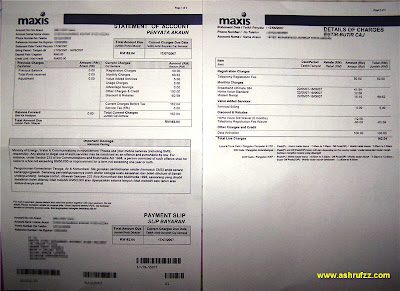
My Maxis Broadband Bill


I read on a forum last time that the first bill would be around RM188 or somewhere less than RM200. I've already set aside RM250 just to pay up so I guess getting the bill for RM162 wasn't too bad after all. If you really drill down the details, I think having a TM Net Streamyx internet connection requires more cost because of the need to pay for the landline alongside with the internet bill. The other plus point is the mobility and instant internet access that Maxis is providing.

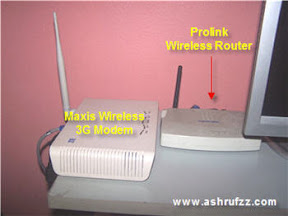
Since I don't really need 2 internet connection, the intention of getting Maxis wireless is for Laadvamore since she wants to be in contact with me through Yahoo Messenger plus using it for her research studies. I then suggested her to hook up the modem using my old Prolink wireless router since my home network got upgraded already. By doing this, since she lives in a hostel, she can move around in her room without being stuck with the bulky modem plus I suggested that she share her internet connection with her friend and charge them a small monthyl fee. That would partially cover the bill and that would be great. The setup looks something like this:

Maxis Wireless Broadband Wi-Fi Setup


Although the speed wasn't so good in Shah Alam but the connection there shows a High Speed Connection (HSDPA). Oh well, at least we can still chat and even do a conference call along with a webcam connectivity. This saves a lot of money for loving couple like myself. If not, I had to burn a hole in my pocket to pay for all those expensive handphone call charges. I just love technology.

Bottomline, answering my previous blog post question, I find Maxis Wireless Internet 3G Broadband worth my money. At least for now of course. ;-)