Showing posts with label gadget. Show all posts

Monday, May 02, 2011

Seagate BlackArmor NAS 110 Centralised Network Storage

I recently read about Seagate buying over Samsung division for its hard disk drive business. I have used several Seagate hard disks so far to store all of my digital stuff. Over the recent years, I only back up all my digital stuff on a portable 160GB hard disk drive. The 160GB was insufficient for me, therefore I had to burn all those stuff using a DVD writer and store it some place else. It was inconvenient and time consuming. I consider myself lucky since I never had any data loss even though my My Compaq Presario V3751AU Laptop ceased to operate anymore. My data back up practice is pretty bad. If for some reason my laptop got stolen or something bad happen, I'll definitely be screwed.

Therefore I made a decision to search for a back up device. I went for a short trip to Low Yat Plaza, after a few hours surveying numerous back-up solutions, I decided on purchasing this Seagate BlackArmor NAS 110 1 TB Network Attached Storage ST310005MNA10G-RK
device:


Seagate BlackArmor NAS 110 Centralised Network Storage


Seagate BlackArmor NAS 110 Centralised Network Storage


Well 1TB is too large for me. My data accumulated over the years are only half of the size. So far, I've only used 26% of what this NAS storage has to offer. There is a few drawback using a NAS, if you are on a wireless network, the data transfer speed rate can only go up to what your wireless device can take. Like mine, I could only transfer 6GB in one hour. That is of course if the signal reception is consistent or when I'm not doing anything on the computer. Other than that, unlike the Buffalo Technology LinkStation Live 1.0TB Shared Network Attached Storage LS-CH1.0TL(Black), this device doesn't have Bittorrent client to automatically download digital stuff I like.

Well at RM299 price, I consider this cheap for a 1TB personal storage solutions. Don't you think so?

*Need more information about Seagate BlackArmor NAS 110 1 TB Network Attached Storage ST310005MNA10G-RK you can check it out at this site.

Tuesday, April 05, 2011

Sharing My Astro With Another TV

Lelong.com.my is one of my favourite online shop whenever I wanted to buy any electronic stuff. Earlier this year I entered a bid to buy a Wireless AV Sender which is compatible with Astro TV decoder. The reason for this was because I wanted to be able to watch Astro TV on another TV without having to buy another decoder or hack my way with those confusing wires and accessories. I won the bid at RM116.


Winning Bid-Genuine OEM Pakite 2.4G Wirelss AV Sender Astro Camera CCTV DVD


For convenience matter, I think for a less than RM150 item is quite reasonable. If you check at Lelong (Type in "astro" on the search box) normally the item is sold between RM180 to RM420. I asked the seller to send the item using Air-Pak since it was an option given by him. I top-up another RM10 on the shipping fee for a more secured delivery. The next week, the item arrived.


Airpak Express packing


One wireless AV sender and one wireless AV receiver


Genuine OEM Pakite 2.4G Wireless AV Sender Astro Camera CCTV DVD packager


After more than 3 months using this device, I am quite happy with it. However, here's a list of pros and cons on this little item:

Pros

      Easy straight forward setup, lightweight, instant, no confusing wires


Cons

  1. The display and sound reception is easily distorted when interfered by numerous electrical items such as microwaves, fans, blender, drills, washing machine etc

  2. The reception distance gets even shorter when there are walls or solid objects

  3. I still can't get the IR remote control on the receiver device to work

Sunday, November 02, 2008

My HTC Touch

It has been over a month after I got my hand on my latest new gadget, my HTC Touch. I've always been keen to have a Windows Mobile device. There is one lying around my house which belongs to my dad and he's not using it. However, the device is bigger than my handphone and the features and the battery is not up to my use so my brother is toying around with it. Recently, my dad bought himself a cheap chinese made TV-PDA phone which he found somewhere in Dubai, he wanted to sell off his HTC Touch. I immediately said I wanted it but of course I'll pay for it later.. ;-)
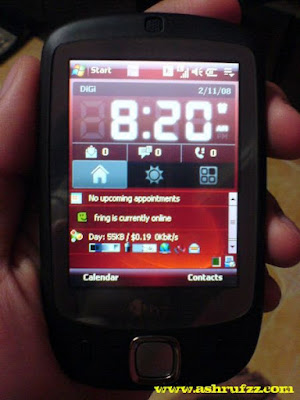


My HTC Touch on DiGi Broadband Mobile
 

The best thing I found out about HTC Touch is its lightweight, running on Windows Mobile 6 Professional, the battery's life is not bad and the touch screen is just something cool. Of course if you compare that to an iPhone, the iPhone is way much cooler. However, the iPhone is more expensive plus there is a lot of softwares that I need doesn't work in iPhone. The only downside in terms of network connectivity is my HTC Touch is running on EDGE and doesn't have 3G connection. Because of that, I choose to subscribe to DiGi HighSpeed Mobile Access with Data Unlimited Plan. I'll cover my experience using DiGi Internet service in my next blog post.


At first I wanted to replace my Sony Ericsson W810i to this HTC Touch. Unfortunately, I found out that typing SMSes using the HTC Touch is so difficult and required precise touching of the screen for the right alphabet to appear. It then became clear that the HTC Touch can only be my second gadget in my pocket.


Thanks to my brother who is using Windows Mobile much earlier than any person I know tip me on a great mobile browser call Opera Mini. I once used my boss's iPhone and recalled how the browser on his iPhone could just slide, zoom in and out. It was so cool, little that I know this browser installed on my HTC Touch could do the same.


ashrufzz.aisyshop.com on Opera Mini Mobile
 

Another application that I like to use is Google Maps for Mobile. Since my HTC Touch doesn't have GPS, the My location function which tells me the nearest node of my DiGi coverage as you can see on the dot on the screenshot below:


Ashrufzz on Google Maps Mobile
 

The star is my favourite places where I used to hang out. It can also be used to estimate the distance of location where I intend to go and show me the route to go there. This is the best application I always run whenever I am hitting the road. If you noticed on the screenshot, I am using a Pocket Controller software. This way, whenever my HTC Touch is connected to my laptop, I don't have to tap the device using my hands anymore. It can work with my mouse and keyboard. Simply genius..


I guess I am becoming more of into gadget junkies with so many electronics I have on my hands. Got to keep on getting more and more resources to fuel my hunger of information technology.